Mainline Audio
The Last Look
Metering & Analysis
Complete metering and analysis for final mix/master decisions—in your DAW or as a dedicated standalone workspace.
Available Now · Introductory Price
$99
Regular price $149
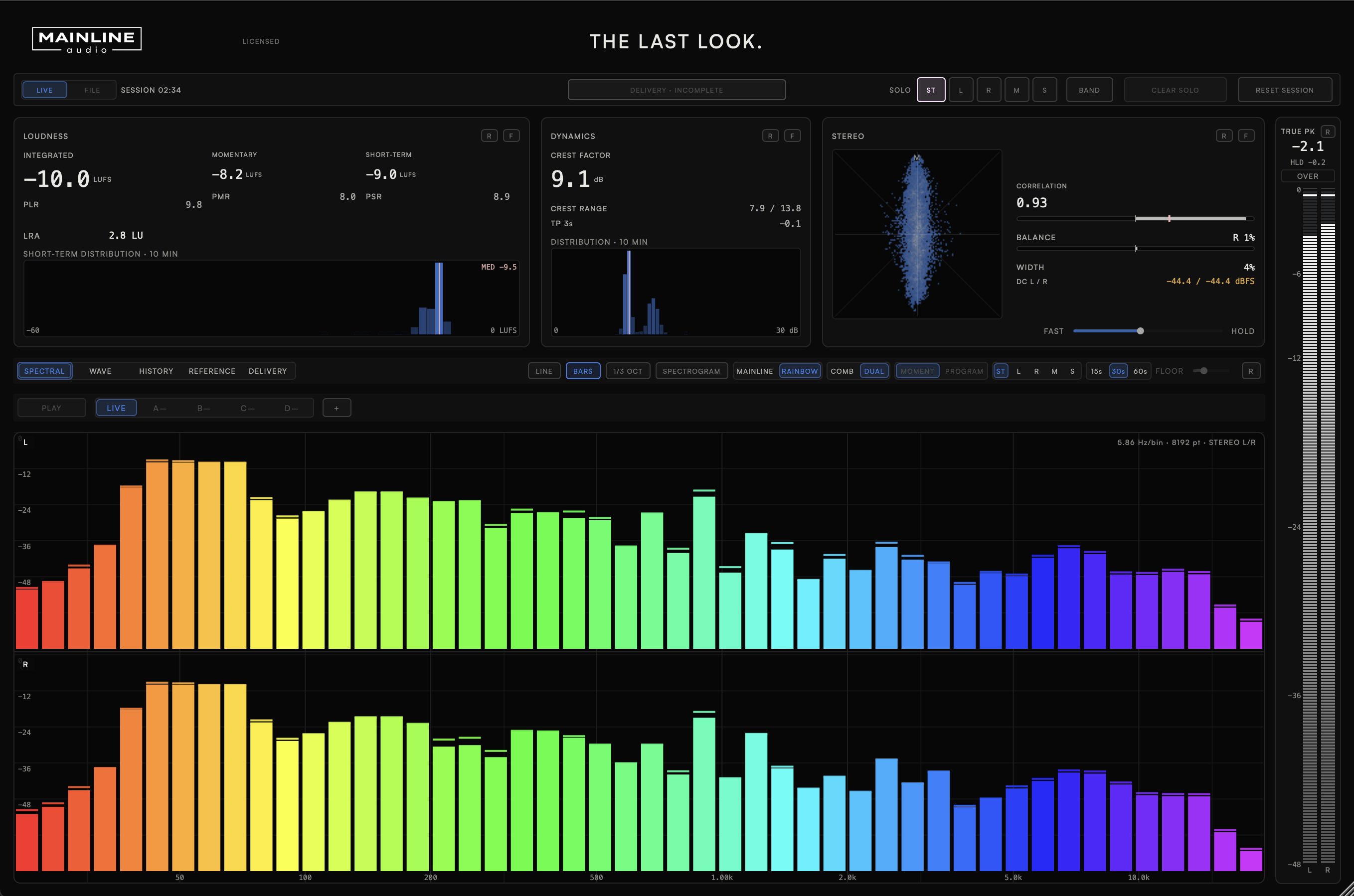
Loudness, dynamics, and stereo image in one read — integrated and short-term LUFS, loudness range, crest factor, and correlation.
True peak, near-full-scale, inter-sample overs, mono fold, and DC offset—checked before you export.
Load WAV, AIFF, FLAC, or MP3 references, compare them with your mix, or open The Last Look on its own to inspect final files without a DAW session.
Trend graphs for loudness, range, crest factor, and correlation over the length of the session, not just an instantaneous reading.
Version 1.0.0 · Release notes →
Every number that decides a final call
Instantaneous readings alongside rolling distributions, not just a single number that hides what the session actually did.
See the balance, not just the meter
A full spectral analyzer alongside the metering — not a second plugin to switch to.
Judge it against something, not just by itself
Built around comparison — your mix against a reference, one pass against another, this section against the rest of the record.
A final check without the session
Open The Last Look as a dedicated app when all you have is the rendered file. Load up to four references, audition and level-match them, inspect Delivery, and save the workspace to return to later. No DAW session, routing setup, or separate analyzer required.
Technical Specifications
| Parameter | Detail |
|---|---|
| Loudness Metrics | Integrated / Short-Term / Momentary LUFS · LRA · PLR · PMR · PSR |
| Dynamics & Stereo | Crest Factor · Crest Range · Correlation · Balance · Width · DC Offset |
| True Peak | Dedicated meter with hold & over indication |
| Analysis Views | Spectral · Wave · History · Reference · Delivery |
| Spectral Display | Line / Bars / 1/3-Octave / Spectrogram |
| Reference File Support | Common audio formats, including MP3 |
| Demo | 14 days, full-featured |
| Formats | AU / VST3 / Standalone |
| Platform | macOS · Apple Silicon & Intel (Universal) |
Now.
AU & VST3 & Standalone · macOS · Apple Silicon & Intel
Join the List
FAQ
What is The Last Look?
The Last Look is a metering and delivery-verification suite built around one final question: is this master actually ready to leave the studio? It brings loudness, dynamics, stereo, spectral, reference, and delivery checks together in one place.
Can I get it now?
Yes — The Last Look is available now.
What formats are supported?
AU, VST3, and Standalone on macOS (Apple Silicon & Intel, Universal). AAX / Windows are not currently supported.
How many computers can I install it on?
Up to 2 computers that you own or control. Deactivate a machine at any time to free up an activation.
Do you offer a demo?
Yes. A fully functional 14-day demo — the same AU/VST3/Standalone installer as the paid version — is available with no feature restrictions. Get it through the free demo checkout above; you'll receive download access by email. Once installed, choose Start 14-Day Demo when you open The Last Look. No payment or license key required.
Will there be updates?
The Last Look checks once, shortly after you open it, for a newer stable version. If one is available, an UPDATE AVAILABLE badge appears; clicking it opens the release notes. The checker only reads the public version manifest—it never downloads or installs software and does not transmit license, project, or usage data. If the check cannot be completed, nothing appears.