Mainline Audio
The Spark Plug
Three-Band Harmonic Saturation
Shape weight, presence, and texture across three independently driven bands. Low, Mid and High each get their own character, drive and blend, split at two crossover points you set, so the harmonics you add to the low end have nothing to do with the ones you add on top.
Launch Price
$49
$79 regular
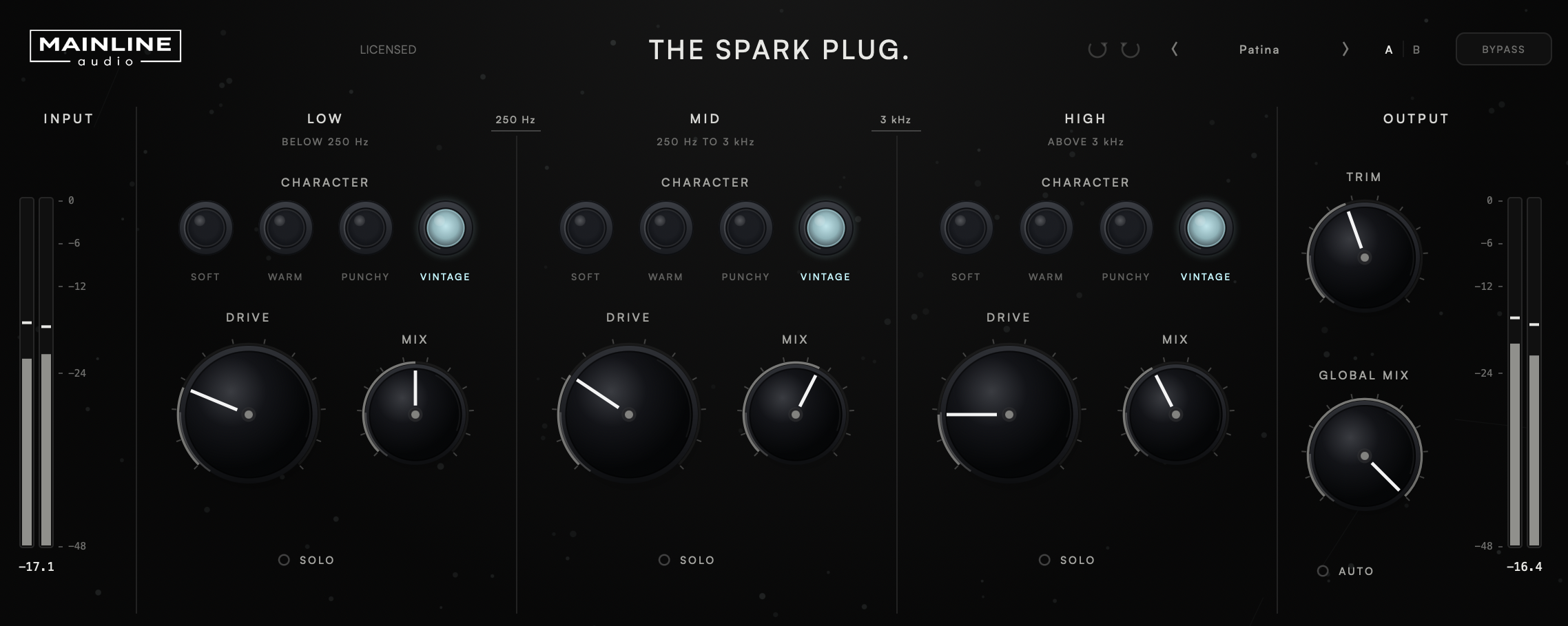
Low, Mid and High each carry their own character mode, drive and blend, split by two crossovers you set yourself. Thicken the low end without dulling the top, or bite the highs alone.
Soft, Warm, Punchy and Vintage — four harmonic curves, chosen per band rather than once for the whole signal. Each band can run a different one at the same time.
Optional level matching for the whole signal, off by default. It compensates the net level change the saturation makes across all three bands, so Drive and Character can be judged by tone rather than loudness. It is applied before Output Trim and never changes your Output Trim setting.
A factory preset bank, user presets, A/B comparison between two full parameter snapshots, undo and redo across every control, and a host-visible bypass.
Version 1.0.1 · Release notes →
Saturation belongs to a frequency range.
Drive a full-range signal and the low end decides how much harmonic content everything else gets. The Spark Plug splits the signal at two crossover points you choose — Low/Mid anywhere from 60 Hz to 900 Hz, Mid/High from 1.1 kHz to 12 kHz — and gives each region its own character mode, its own drive, and its own blend against its own dry signal. Weight in the lows, presence in the mids, air or bite on top, each decided on its own terms.
The crossovers are Linkwitz-Riley, 24 dB per octave, so the bands overlap through the transition rather than switching at a hard frequency split. They default to 250 Hz and 3 kHz, and the frequency printed on each divider is the control — drag it, or right-click to type an exact value.
Four curves, not four presets.
Each mode is a different harmonic transfer curve. Soft, Warm and Vintage are level-matched at 0 dB Drive, so at that setting a change of mode is a change in harmonic content, not in level. Punchy is transient-reactive by design, so its level follows the material slightly.
All nonlinear processing runs oversampled, at a factor fixed by your session's sample rate, so the harmonics the curves generate stay where they belong instead of folding back down the spectrum.
Level stays your decision.
Drive is a gain into a curve, so a band that sounds right is usually louder than the one you started with. The Spark Plug gives you two separate answers to that, and keeps them separate.
A fixed output stage holds the plug-in's own output at full scale so a hard drive setting cannot leave the plug-in above 0 dBFS. It has no control, never touches a signal below −1 dBFS, and is protection rather than a mastering limiter. The output meter’s clip marker lights whenever the output would otherwise have gone over 0 dBFS.
Built to be used, not admired.
The header carries the things you reach for while you work, in the same arrangement as the rest of the Mainline Audio line.
The details.
| Bands | Low / Mid / High, independently driven |
| Character (per band) | Soft / Warm / Punchy / Vintage |
| Drive (per band) | 0 dB – 24 dB (default 0 dB) |
| Mix (per band) | 0% – 100% (default 100%) |
| Solo (per band) | Any combination |
| Low/Mid Crossover | 60 Hz – 900 Hz (default 250 Hz) |
| Mid/High Crossover | 1.1 kHz – 12 kHz (default 3 kHz) |
| Crossovers | Linkwitz-Riley, 24 dB / octave |
| Global Mix | 0% – 100% (default 100%) |
| Auto Gain | Off by default · never alters Output Trim |
| Output Trim | ±24 dB (default 0 dB) |
| Metering | Input and output stereo peak, per-channel clip indication |
| Workflow | Factory presets, user presets, A/B compare, undo/redo, host bypass |
| Processing | Oversampled nonlinear stage, factor fixed by sample rate |
| Latency | Under 3 ms · reported to the host and compensated |
| Channels | Mono and stereo |
| Formats | AU / VST3 |
| Platform | macOS · Apple Silicon & Intel (Universal) |
| Version | 1.0.1 |
Four Characters.
VST3 & AU · macOS · Apple Silicon & Intel
Join the List
What is The Spark Plug?
A three-band harmonic saturator. The signal is split into Low, Mid and High at two crossover points you set, and each band gets its own character mode, drive amount and dry/wet blend, so the harmonics added to one region are independent of the others.
Why three bands instead of one saturator?
Because a full-range drive lets the loudest part of the signal, usually the low end, decide how much harmonic content everything else receives. Three bands let you add weight down low without dulling the top, or add bite on top without thickening the bass. It’s not just independent levels, either — each band carries its own Character curve, so Low can run Vintage while High stays Soft, rather than one mode deciding for the whole signal.
What is the difference between the four character modes?
Each is a different harmonic transfer curve. Soft is a gentle symmetric round-off that stays out of the way at low drive. Warm is asymmetric, with even-harmonic content that grows with level. Punchy reacts to transients, crossfading toward a more aggressive curve with added presence. Vintage is tape-style even-harmonic saturation with high-frequency softening and a nonlinear low-end resonance.
Does Auto Gain change my Output Trim?
No. Auto Gain measures the processed signal against the unprocessed band sum and applies its compensation before Output Trim, so the number in the Output Trim field is always the one you set. It is off by default, and switching it off returns the plug-in to exactly the level it had without it.
Is the output stage a limiter?
No. It is a fixed safety stage that keeps the plug-in's own output from exceeding full scale at extreme drive settings. It has no control and it never touches a signal below −1 dBFS. It is not a mastering limiter and is not intended as one. The output meter’s clip marker lights whenever the output would otherwise have gone over 0 dBFS.
Does it add latency?
Yes, a small fixed amount from the oversampled nonlinear stage. It is reported to the host, which compensates for it, and bypassed output is the input delayed by exactly that amount so a bypass comparison stays aligned.
What formats are supported?
VST3 and AU on macOS (Apple Silicon & Intel, Universal). AAX / Windows are not currently supported.
How many computers can I install it on?
Up to 2 computers that you own or control.
Is educational licensing available?
Educational and institutional licensing may be available for schools, labs, and training facilities. Contact Mainline Audio for details.
Do you offer a demo?
Yes. A fully functional 14-day demo — the same AU/VST3 installer as the paid version — runs with no audio interruptions, muting, or feature restrictions. Get it through the free demo checkout above; you’ll receive download access by email. Once installed, choose Start 14-Day Demo when you open The Spark Plug. No payment or license key required.
Will there be updates?
The Spark Plug checks once, shortly after you open it, for a newer stable version. If one is available, an UPDATE AVAILABLE badge appears; clicking it opens this page. The checker only reads the public version manifest—it never downloads or installs software and does not transmit license, project, or usage data. If the check cannot be completed, nothing appears.